
Microsoft 365 backup isn’t as straightforward as most people think.
A client called me in a panic recently. Someone on their team had deleted a shared folder in SharePoint. Important documents, gone. They assumed Microsoft would sort it, because surely their data was backed up in the cloud?
It wasn’t. Not in the way they thought.
After a lot of digging, we recovered most of what they’d lost, but it was a close call. And they’re not alone. It’s one of the most common misconceptions I come across: that using Microsoft 365 automatically protects your data.
It isn’t. Here’s why, and what to do about it.
What Microsoft 365 actually gives you
Microsoft does include some built-in data tools with every 365 subscription. There’s the Recycle Bin for deleted files, version history in SharePoint and OneDrive, and retention policies you can set up in the Compliance Centre. For Exchange, there’s litigation hold and a degree of mailbox-level recovery.
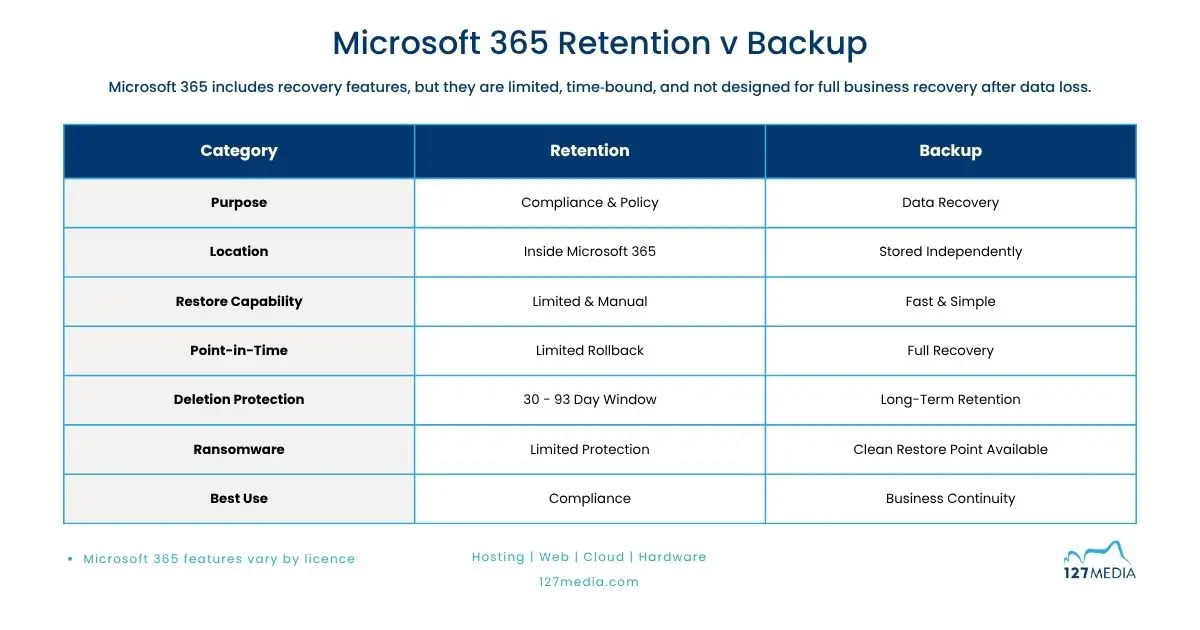
These are useful. But they’re not a backup. Microsoft builds them for operational continuity and compliance, not for recovering your data after something goes wrong.
There’s a meaningful difference, and it matters.
What retention policies actually do
A retention policy tells Microsoft how long to keep a piece of data before it’s deleted, or how long to hold on to it even if someone tries to delete it early. That’s it.
It won’t reliably let you roll back your environment or data set to a clean point in time across the business. It won’t recover a mailbox that was deleted after a member of staff left. It won’t restore a SharePoint site that was wiped out by ransomware. And it certainly won’t give you a clean, point-in-time snapshot of your data from before an incident happened.
Think of a retention policy like a legal filing cabinet. It keeps records for the right amount of time and stops people from throwing things away too early. That has its place. But if the office floods, the filing cabinet doesn’t save you.
The gaps that catch businesses out
Here are the situations where Microsoft 365’s built-in tools regularly fall short for small and medium businesses:
Accidental deletion with a long tail. Microsoft’s Recycle Bin holds deleted items for 30 to 93 days depending on the workload. If no one notices a file is missing until three months later, it’s gone.
Staff leaving the business. When you remove a Microsoft 365 licence, the associated data is at risk. Without proper backup, mailboxes and OneDrive content can be deleted automatically once the licence is gone.
Ransomware. If ransomware encrypts your SharePoint files or OneDrive content, the encrypted versions can sync across and overwrite your version history. Retention policies won’t protect you here.
Shared mailboxes and Teams data. These are easy to overlook in a retention policy setup, and often aren’t configured at all in smaller businesses.
Misconfigured policies. Retention policies require careful setup. A policy that’s set up incorrectly can either delete data too soon or create a false sense of security.
Why Microsoft 365 backup needs a dedicated solution
Microsoft itself is clear that it operates on a shared responsibility model. Microsoft keeps the platform running. Protecting what’s in it is your responsibility.
A proper Microsoft 365 backup solution runs independently of the platform. It takes regular, scheduled snapshots of your data across email, OneDrive, SharePoint, and Teams. It stores those copies separately. And it lets you restore individual items, full mailboxes, or entire sites to a specific point in time, quickly and cleanly.
That’s a fundamentally different proposition to a retention policy.
Why we use AvePoint for Microsoft 365 backup
At 127 Media, we use AvePoint Cloud Backup ourselves and manage it for our clients, too. If we’re trusting it to protect our own business data, you can be confident we’d only recommend it to you for the same reason. Here’s what makes it the right choice for UK SMBs:
Everything is covered. AvePoint backs up Exchange mailboxes, OneDrive, SharePoint, Microsoft Teams (including chat history and Planner tasks), Microsoft 365 Groups, and more. Nothing slips through.
Granular restore, not all or nothing. You can restore a single email, a specific file, a calendar appointment, or an entire SharePoint site. You choose the point in time. AvePoint doesn’t force you to roll back everything just to recover one item.
Backups run up to four times a day. Even in a worst-case scenario, you’re unlikely to lose more than a few hours of work.
Ransomware protection built in. AvePoint monitors daily change rates across your backed-up data and flags unusual activity early. If you do get hit, you can restore to a clean point before the attack took hold.
Data stays in the right place. Backup data can be stored in UK-based storage, which matters for businesses with GDPR considerations or data sovereignty requirements.
Proof you can show. Every backup job produces a report. If you’re ever asked by a client, a regulator, or an auditor whether your data is protected, you can show the evidence.

What would happen to your business data today?
If someone deleted your most important SharePoint folder right now, how quickly could you get it back? What if a member of staff left suddenly and you needed to access their emails six months later? What if ransomware encrypted your Teams files overnight?
If you’re not confident in the answers, it’s worth taking a look at how your Microsoft 365 data is actually protected.
We can review your current setup, identify any gaps, and walk you through what a proper Microsoft 365 backup looks like in practice. There’s no commitment, and it won’t take long.
Get in touch.